Prometheus部署
1、二进制部署
官网二进制安装包:https://prometheus.io/download/
Github安装包地址: https://github.com/prometheus/prometheus/releases
示例:
## 1、下载安装包
wget https://github.com/prometheus/prometheus/releases/download/v3.5.0/prometheus-3.5.0.linux-amd64.tar.gz
## 2、解压到指定目录并创建软连接
tar xvf prometheus-3.5.0.linux-amd64.tar.gz -C /usr/local
ln -s prometheus-3.5.0.linux-amd64  prometheus
## 3、创建相关目录,data目录是默认的存放数据目录,可以不创建,系统会自动创建,可以通过选项--storage.tsdb.path="data/"修改
# 规划目录,创建prometheus用户,方便后续管理以及使用service方式启动
mkdir bin conf data
mv prometheus promtool bin/
mv prometheus.yml conf/
useradd -r -s /sbin/nologin prometheus
chown -R prometheus.prometheus /usr/local/prometheus/
## 4、修改环境变量
vim /etc/profile
export PROMETHEUS_HOME=/usr/local/prometheus
export PATH=${PROMETHEUS_HOME}/bin:$PATH

source /etc/profile
# 检查配置文件是否正确的命令
promtool check config /usr/local/prometheus/conf/prometheus.yml
## 5、创建service文件,方便后续使用systemctl 方式启动
cat > /lib/systemd/system/prometheus.service <<EOF
[Unit]
Description=Prometheus Server
Documentation=https://prometheus.io/docs/introduction/overview/
After=network.target
[Service]
Restart=on-failure
User=prometheus
Group=prometheus
WorkingDirectory=/usr/local/prometheus/
ExecStart=/usr/local/prometheus/bin/prometheus --config.file=/usr/local/prometheus/conf/prometheus.yml --web.enable-lifecycle
ExecReload=/bin/kill -HUP \$MAINPID
LimitNOFILE=65535
[Install]
WantedBy=multi-user.target
EOF
## 加载service配置并启动prometheus
systemctl daemon-reload
systemctl enable --now prometheus.service
ss -tnlp |grep prometheus
#选项--web.enable-lifecycle支持reload加载修改过的配置
curl -X POST http://localhost:9090/-/reload #选项--web.enable-lifecycle支持远程关闭prometheus服务,安全风险

API访问
# Prometheus提供了一组管理API,以简化自动化和集成
健康检查: {ip:port} 是Prometheus所在的IP和端口
GET {ip:port}/-/healthy
该端点始终返回200,应用于检查Prometheus的运行状况。
准备检查
GET {ip:port}/-/ready
当Prometheus准备服务流量(即响应查询)时,此端点返回200。
加载配置
PUT {ip:port}/-/reload
POST {ip:port}/-/reload
关闭服务
PUT {ip:port}/-/quit
POST {ip:port}/-/quit

Prometheus常用启动选项
/usr/local/prometheus/bin/prometheus --help

--web.enable-lifecycle #可以支持http方式实现reload和shutdown功能,可以被远程关毕服务,有安全风险,不建议开启,默认关闭
--web.read-timeout=5m  #Maximum duration before timing out read of the request, andclosing idle connections. 请求连接的最⼤等待时间,可以防⽌太多的空闲连接占⽤资源
--web.max-connections=512 #Maximum number of simultaneous connections. 最⼤链接数
--storage.tsdb.retention=15d #How long to retain samples in the storage.prometheus开始采集监控数据后 会存在内存中和硬盘中对于保留期限的设置,此值太长会导致硬盘和内存都吃不消,但太短要查历史数据就没有了,企业中一般设置15天为宜,默认值为0
--storage.tsdb.path="data/" #Base path for metrics storage. 存储数据路径,建议独立分区,防止把根⽬录塞满,默认data/目录
--query.timeout=2m #Maximum time a query may take before being aborted.此为默认值2m
--query.max-concurrency=20 #Maximum number of queries executed concurrently.此为默认值20
2、Docker容器方式部署
官网: https://prometheus.io/docs/prometheus/latest/installation/
Github网站 https://github.com/prometheus/prometheus/blob/main/Dockerfile
示例:
#默认容器的配置文件路径/etc/prometheus/prometheus.yml。数据存储路径默认为/prometheus
docker run -d --name prometheus -p 9090:9090 prom/prometheus
#定制配置,持久化
docker run -d --name prometheus -p 9090:9090 -v ./prometheus.yml:/etc/prometheus/prometheus.yml -v prometheus_data:/prometheus prom/prometheus:v2.53.0
#定制配置文件启动
docker run -d --add-host "prometheus.linux.org:10.0.0.201" --name=prometheus -p 9090:9090 -v ./prometheus.yml:/etc/prometheus/prometheus.yml prom/prometheus --web.enable-lifecycle
3、k8s上部署Prometheus
建议使用kube-prometheus: https://github.com/prometheus-operator/kube-prometheus
1、下载指定版本的kube-prometheus
wget https://github.com/prometheus-operator/kube-prometheus/archive/refs/tags/v0.16.0.tar.gz
2、参考官网命令部署,镜像问题需要手动解决
kubectl apply --server-side -f manifests/setup
kubectl wait \
    --for condition=Established \
    --all CustomResourceDefinition \
    --namespace=monitoring
kubectl apply -f manifests/
3、卸载Prometheus命令
kubectl delete --ignore-not-found=true -f manifests/ -f manifests/setup

4、配置ingrss,使外部可通过域名访问Prometheus的各个地址(可选),需部署ingress-nginx
vim ingress-kube-prometheus.yaml

apiVersion: networking.k8s.io/v1
kind: Ingress
metadata:
  name: prometheus
  namespace: monitoring
  labels:
    app: prometheus
spec:
  ingressClassName: 'nginx'
  rules:
  - host: prometheus.haogedu.com
    http:
      paths:
      - path: /
        pathType: Prefix
        backend:
          service:
            name: prometheus-k8s
            port:
              number: 9090
  - host: grafana.haogedu.com
    http:
      paths:
      - path: /
        pathType: Prefix
        backend:
          service:
            name: grafana
            port:
              number: 3000
  - host: alertmanager.haogedu.com
    http:
      paths:
      - path: /
        pathType: Prefix
        backend:
          service:
            name: alertmanager-main
            port:
              number: 9093
  - host: blackbox.haogedu.com
    http:
      paths:
      - path: /
        pathType: Prefix
        backend:
          service:
            name: blackbox-exporter
            port:
              number: 19115


kubectl apply -f  ingress-kube-prometheus.yaml

5、配置黑盒监控来监控网站是否可达
vim probe-example.yaml

apiVersion: monitoring.coreos.com/v1
kind: Probe
metadata:
  name: web-probe-demo
  namespace: monitoring
spec:
  jobName: http-get
  interval: 10s
  module: http_2xx
  prober:
    url: blackbox-exporter.monitoring.svc:19115
    scheme: http
    path: /probe
  targets:
    staticConfig:
      static:
      - http://www.haogedu.com
      - https://www.google.com

kubectl apply -f probe-example.yaml
浏览器访问: http://blackbox.haogedu.com/ 可查看到黑盒监控结果

6、监控service地址是否可达

vim servicemonitor-example.yaml
apiVersion: apps/v1
kind: Deployment
metadata:
    name: metrics-app
spec:
  replicas: 2
  selector:
    matchLabels:
      app: metrics-app
      controller: metrics-app
  template:
    metadata:
      labels:
        app: metrics-app
        controller: metrics-app
      annotations:
        prometheus.io/scrape: "true"
        prometheus.io/port: "80"
        prometheus.io/path: "/metrics"
    spec:
      containers:
      - image: ikubernetes/metrics-app
        name: metrics-app
        ports:
        - name: web
          containerPort: 80
        resources:
          requests:
            memory: "256Mi"
            cpu: "500m"
          limits:
            memory: "256Mi"
            cpu: "500m"
---
apiVersion: v1
kind: Service
metadata:
  name: metrics-app
  labels:
    app: metrics-app
spec:
  type: ClusterIP
  ports:
  - name: web
    port: 80
    targetPort: 80
  selector:
    app: metrics-app
    controller: metrics-app
---
apiVersion: monitoring.coreos.com/v1
kind: ServiceMonitor
metadata:
  name: metrics-app-servicemonitor
  labels:
    app: metrics-app
    release: prometheus
spec:
  selector:
    matchLabels:
      app: metrics-app
  #namespaceSelector:
  #  matchNames:
  #  - default
  endpoints:
  - port: web
    interval: 15s

kubectl apply -f servicemonitor-example.yaml
Node_exporter部署
安装 Node Exporter 用于收集各 node 主机节点上的监控指标数据,监听端口为9100
github 链接: https://github.com/prometheus/node_exporter
官方下载: https://prometheus.io/download/
二进制安装步骤
wget -P /usr/local/ https://github.com/prometheus/node_exporter/releases/download/v1.2.2/node_exporter-1.2.2.linux-amd64.tar.gz
cd /usr/local
tar xvf node_exporter-1.2.2.linux-amd64.tar.gz
ln -s node_exporter-1.2.2.linux-amd64 node_exporter
cd node_exporter
mkdir bin
mv node_exporter bin/
useradd -r -s /sbin/nologin prometheus
chown -R prometheus:prometheus /usr/local/node_exporter/
准备service文件
cat /lib/systemd/system/node_exporter.service
[Unit]
Description=Prometheus Node Exporter
After=network.target
[Service]
Type=simple
#no-collector.uname:禁止收集uname信息,会导致grafana无法显示此主机信息
#ExecStart=/usr/local/node_exporter/bin/node_exporter --no-collector.uname --collector.cgroups
ExecStart=/usr/local/node_exporter/bin/node_exporter --collector.cgroups
ExecReload=/bin/kill -HUP $MAINPID
Restart=on-failure
User=prometheus
Group=prometheus
[Install]
WantedBy=multi-user.target

启动 Node Exporter 服务
systemctl daemon-reload
systemctl enable --now node_exporter.service
systemctl is-active node_exporter
#默认监听9100/tcp端口
ss -ntlp|grep node_exporter
容器化启动node-exporter
docker run -d --net="host" --pid="host" -v "/:/host:ro,rslave" quay.io/prometheus/node-exporter:latest --path.rootfs=/hostKubernetes部署 node-exporter
kubernetes 部署Node-exporter并集成 Prometheus自动发现
# cat yaml/node-exporter-ds.yaml
apiVersion: apps/v1
kind: DaemonSet
metadata:
  name: prometheus-node-exporter
  namespace: prom
  labels:
    app: prometheus
    component: node-exporter
spec:
selector:
  matchLabels:
    app: prometheus
    component: node-exporter
template:
  metadata:
    name: prometheus-node-exporter
    labels:
      app: prometheus
      component: node-exporter
  spec:
    tolerations:
    - effect: NoSchedule
      key: node-role.kubernetes.io/master
    containers:
    - image: prom/node-exporter:v1.5.0
      name: prometheus-node-exporter
      ports:
      - name: prom-node-exp
        containerPort: 9100
        hostPort: 9100
    hostNetwork: true
    hostPID: true

cat yaml/node-exporter-svc.yaml
apiVersion: v1
kind: Service
metadata:
  annotations:
    prometheus.io/scrape: 'true' #配置由kubernetes自动发现加入prometheus的target中
  name: prometheus-node-exporter
  namespace: prom
  labels:
    app: prometheus
    component: node-exporter
  spec:
    clusterIP: None
    ports:
    - name: prometheus-node-exporter
      port: 9100
      protocol: TCP
    selector:
      app: prometheus
      component: node-exporter
    type: ClusterIP
Node Exporter 常见的指标
node_boot_time_seconds:从1970.1.1到系统自启动以后的总计时间
node_cpu*:系统CPU使用量
node_disk*:磁盘IO
node_filesystem*:系统文件系统用量
node_load1:系统CPU负载
node_memeory*:内存使用量
node_network*:网络带宽指标
node_time:当前系统时间
go_*:node exporter中go相关指标
process_*:node exporter自身进程相关运行指标
Prometheus 采集 Node Exporter 数据
修改 Prometheus 配置文件
grep -Ev '^ *#|^$' /usr/local/prometheus/conf/prometheus.yml
global:
  scrape_interval: 15s # Set the scrape interval to every 15 seconds. Default isevery 1 minute.
  evaluation_interval: 15s # Evaluate rules every 15 seconds. The default is every 1 minute.
alerting:
  alertmanagers:
    - static_configs:
      - targets:
rule_files:
scrape_configs:
 - job_name: "prometheus"
   static_configs:
     - targets: ["localhost:9090"]
 - job_name: 'node_exporter'  #添加以下行,指定监控的node exporter节点
   metrics_path: /metrics    #指定路径,此为默认值,可省略
   scheme: http         #指定协议,此为默认值,可省略
   static_configs:
   - targets: ['10.0.0.104:9100','10.0.0.105:9100','10.0.0.106:9100']  #可以支持这种格式
   #- '10.0.0.104:9100' 或者以这种格式也可以支持
   #- '10.0.0.105:9100'

#属性解析:
#新增一个job_name 和 static_configs的属性
#每一个 target 即前面基本提到的实例 instance,格式就是"ip:port"

检查语法
promtool check config /usr/local/prometheus/conf/prometheus.yml
重载配置
systemctl reload prometheus
Grafana 展示 Prometheus 数据
Grafana部署
Grafana官方下载链接: https://grafana.com/grafana/download
下载软件
wget https://dl.grafana.com/enterprise/release/grafana-enterprise_11.3.1_amd64.deb
从国内镜站下载
wget
wget https://mirrors.tuna.tsinghua.edu.cn/grafana/apt/pool/main/g/grafana/grafana_12.1.0_amd64.deb
#安装
#方法1:手动安装依赖包
apt-get install -y adduser libfontconfig1 musl
dpkg -i grafana_12.1.0_amd64.deb

#方法2:可以解决依赖关系
apt update && apt -y install ./grafana_12.1.0_amd64.deb
#启动服务
systemctl enable --now grafana-server
#如果安装失败,解决依赖关系
apt -y --fix-broken install
# 查看插件列表(此步可选)
grafana-cli plugins list-remote
#安装饼状图的插件,如果安装失败,多试几次(此步可选)
grafana-cli plugins install grafana-piechart-panel
grafana-cli plugins ls
#安装的插件存放在如下目录中
ls /var/lib/grafana/plugins/
#启动服务
systemctl daemon-reload && systemctl enable --now grafana-server.service
# grafana默认使用3000端口
Grafana基于Docker部署
docker run -d --name=grafana -p 3000:3000 grafana/grafanaGrafana官网展示模板
https://grafana.com/grafana/dashboards/
找到对应模板编号或者json文件下载,然后再本地Grafana界面内导入即可
Prometheus的PromQL基础
数据模型
Prometheus中,每个时间序列都由指标名称(Metric Name)和标签(Label)来唯一标识
Metric Name的表示方式有下面两种
<metric name>{<label name>=<label value>, …}"
{__name__="metric name",<label name>=<label value>, …} #通常用于Prometheus内部

指标名称:
  通常用于描述系统上要测定的某个特征
  支持使用字母、数字、下划线和冒号,且必须能匹配RE2规范的正则表达式
  例如:http_requests_total表示接收到的HTTP请求总数
标签:
  键值型数据,附加在指标名称之上,从而让指标能够支持更多细化的多纬度特征;此为可选项
  标签名称可使用字母、数字和下划线,且必须能匹配RE2规范的正则表达式
  注意:以两个下划线 "__" 为前缀的名称为Prometheus系统预留使用
例如: 下面代表着两个不同的时间序列
http_requests_total{method=GET}
http_requests_total{method=POST}
样本数据
Prometheus的每个数据样本由两部分组成
key: 包括三部分Metric 名称,Label, Timestamp(毫秒精度的时间戳)
value: float64格式的数据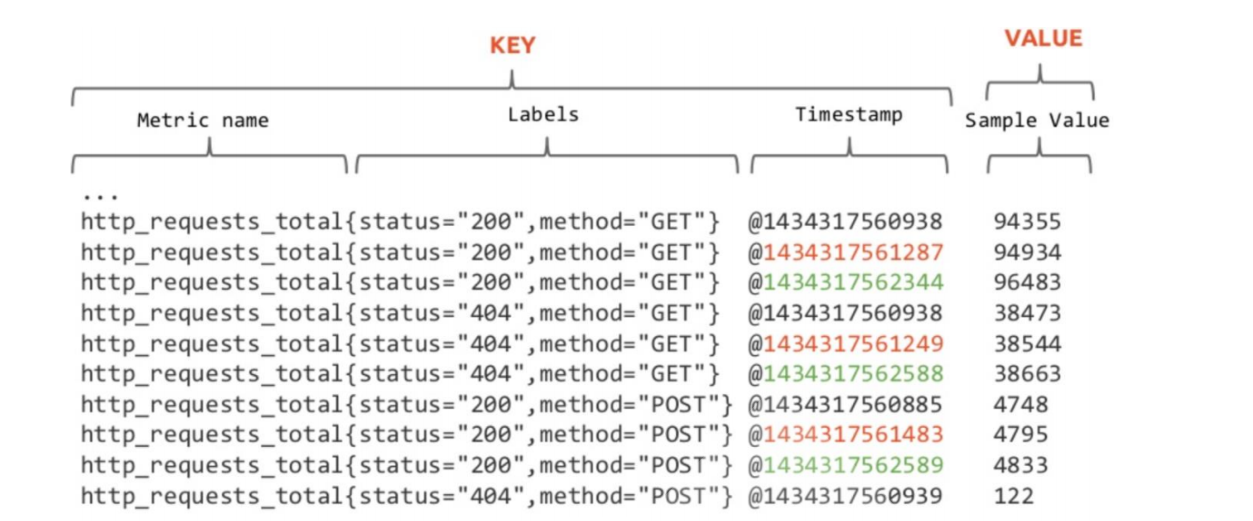
PromQL支持基于定义的指标维度进行过滤,统计和聚合
- 指标名称和标签的特定组合代表着一个时间序列
- 不同的指标名称代表着不同的时间序列
- 指标名称相同,但标签不同的组合分别代表着不同的时间序列
- 更改任何标签值,包括添加或删除标签,都会创建一个新的时间序列
- 应该尽可能地保持标签的稳定性,否则,则很可能创建新的时间序列,更甚者会生成一个动态的数据环境,并使得监控的数据源难以跟踪,从而导致建立在该指标之上的图形、告警及记录规则变得无效
PromQL
官网文档: https://prometheus.io/docs/prometheus/latest/querying/basics/
每一个PromQL其实都是一个表达式,这些语句表达式或子表达式的计算结果可以为以下四种类型:
- instant vector 即时向量,瞬时数据
具有相同时间戳的一组样本值的集合
在某一时刻,抓取的所有监控项数据。这些度量指标数据放在同一个key中。
一组时间序列,包含每个时间序列的单个样本,所有时间序列共享相同的时间戳 - range vector 范围向量
指定时间范围内的所有时间戳上的数据指标,即在一个时间段内,抓取的所有监控项数据。
一组时间序列,其中包含每个时间序列随时间变化的一系列数据点 - scalar 标量
一个简单的浮点类型数值 - string 字符串
一个简单字符串类型, 当前并没有使用, a simple string value; currently unused
数据选择器
1、即时向量选择器
所谓的数据选择器,其实指的是获取实时数据或者历史数据的一种方法
metrics_name{筛选label=值,...}[<时间范围>] offset <偏移>匹配器用于定义标签过滤条件,目前支持如下4种匹配操作符
=  #精确匹配
!= #不匹配
=~ #正则匹配,全部匹配,而非包含
!~ #正则不匹配
1、匹配到空标签值的匹配器时,所有未定义该标签的时间序列同样符合条件
例如:
http_requests_total (env=””) ,则该指标名称上所有未使用该标签env的时间序列或者env的值为空的都符合条件,比如时间序列http_requests_total {method =”get”}
2、正则表达式将执行完全锚定机制,它需要匹配指定的标签的整个值
例如:
http_requests_total { method =“^ge” } 是不对的,应该是http_requests_total {method =“^ge.*”}
3、多个条件间可以使用逗号”,”隔开,每个条件内部可以通过多种符号,表示不同含义,如果条件中存在多值,可以使用”|”表示或
比如:env=“staging|testing|development”“.*”}和{job=””}
4、向量选择器至少要包含一个指标名称,或者条件中至少包含一个非空标签值的选择器
例如:不能写成{job=
5、使用name做为标签名称,能够对指标名称进行过滤
#示例:
{__name__=~"http_requests_.*"}
#能够匹配所有以"http_requests_"为前缀的所有指标
prometheus_http_requests_total{instance="localhost:9090", job="prometheus"}
prometheus_http_requests_total{handler=~".*meta.*"}
node_memory_MemFree_bytes{instance=~"10.0.0.(101|102):9100"}
#注意:指标 prometheus_http_requests_total 默认情况下,针对的是 localhost:9090 的target,其他无效
2、范围选择器
工作方式与瞬时向量选择器一样,区别在于时间范围长一些
返回0个、1个或多个时间序列上在给定时间范围内的各自的一组样本值
主要是在瞬时选择器多了一个[]格式的时间范围后缀
在[]内部可以采用多个单位表示不同的时间范围,比如s(秒)、m(分)、h(时)、d(日)、w(周)、y(年)
必须使用整数时间单位,且能够将多个不同级别的单位进行串联组合,以时间单位由大到小为顺序
例如:1h30m,但不能使用1.5h
prometheus_http_requests_total{job="prometheus"}[5m]
#属性解析:这表示过去5分钟内的监控数据值,这些数据一般以表格方式展示,而不是列表方式展示
偏移修饰符 offset
对于某个历史时间段中的数据,需要通过offset时间偏移的方式来进行获取
偏移量修改器的使用方法是紧跟在选择器表达式之后使用”offset”关键字指定
注意:offset与数据选择器是一个整体,不能分割,offset 偏移的是时间基点
prometheus_http_requests_total offset 5m #表示获取以prometheus_http_requests_total为指标名称的所有时间序列在过去5分钟之时的即时样本
prometheus_http_requests_total{code="200"} offset 5m
#如果既有偏移又有范围,先偏移后再取范围,如[5m] offset 3m 表示取当前时间的3分钟前的5m范围的值
http_requests_total[5m] offset 1d #表示获取距此刻1天时间之前的5分钟之内的所有样本
http_requests_total{handler="/metrics"}[5m] offset 3m
PromQL 运算
二元运算符
对于二元运算符来说,它主要包含三类:算术、比较、逻辑
#算术运算符:
+ (addition)
- (subtraction)
* (multiplication)
/ (division)
% (modulo)
^ (power/exponentiation)
#比较运算符:
== (equal)
!= (not-equal)
> (greater-than)
< (less-than)
>= (greater-or-equal)
<= (less-or-equal)
#逻辑运算符:
and、or、unless
#目前该运算符仅允许在两个即时向量之间进行操作,不支持标量(标量只有一个数字,没有时序)参与运算

#运算符从高到低的优先级
1 ^
2 *, /, %
3 +, -
4 ==, !=, <=, <, >=, >
5 and, unless
6 or

#注意:
#具有相同优先级的运算符满足结合律(左结合),但幂运算除外,因为它是右结合机制
#可以使用括号()改变运算次序
示例:
#正则表达式
node_memory_MemAvailable_bytes{instance =~ "10.0.0.20.:9100"}
node_memory_MemAvailable_bytes{instance =~ "10.0.0.20[12]:9100"}
node_memory_MemAvailable_bytes{instance =~ "10.0.0.20[1-3]:9100"}
node_memory_MemAvailable_bytes{instance =~ "10.0.0.20.*:9100"}
node_memory_MemAvailable_bytes{instance =~ "10.0.0.20[0-9]:9100"}
node_memory_MemAvailable_bytes{instance =~ "10.0.0.20[^01]:9100"}
node_memory_MemAvailable_bytes{instance !~ "10.0.0.20[12]:9100"}
#单位换算
node_memory_MemFree_bytes / (1024 * 1024)
#可用内存占用率
node_memory_MemAvailable_bytes/node_memory_MemTotal_bytes * 100

#内存使用率
(node_memory_MemTotal_bytes - node_memory_MemFree_bytes) / node_memory_MemTotal_bytes * 100
#磁盘使用率
(node_filesystem_size_bytes{mountpoint="/"} - node_filesystem_free_bytes{mountpoint="/"}) / node_filesystem_size_bytes{mountpoint="/"} * 100

#阈值判断
(node_memory_MemTotal_bytes - node_memory_MemFree_bytes) / node_memory_MemTotal_bytes > 0.95
#内存利用率是否超过80
( 1 - node_memory_MemAvailable_bytes/node_memory_MemTotal_bytes ) * 100 > bool 80
聚合操作
一般说来,单个指标的价值不大,监控场景中往往需要联合并可视化一组指标,这种联合机制是指”聚合”操作,例如,将计数、求和、平均值、分位数、标准差及方差等统计函数应用于时间序列的样本之上生成具有统计学意义的结果等
对查询结果事先按照某种分类机制进行分组(groupby)并将查询结果按组进行聚合计算也是较为常见的需求,例如分组统计、分组求平均值、分组求和等
常见的11种聚合操作:
sum() #对样本值求和
avg() #对样本值求平均值,这是进行指标数据分析的标准方法
count()#对分组内的时间序列进行数量统计
min()#求取样本值中的最小者
max()#求取样本值中的最大者
topk()#逆序返回分组内的样本值最大的前k个时间序列及其值
bottomk()#顺序返回分组内的样本值最小的前k个时间序列及其值
quantile()#分位数用于评估数据的分布状态,该函数会返回分组内指定的分位数的值,即数值落在小于等于指定的分位区间的比例
count_values()#对分组内的时间序列的样本值进行数量统计
stddev() #对样本值求标准差,以帮助用户了解数据的波动大小(或称之为波动程度)
stdvar() #对样本值求方差,它是求取标准差过程中的中间状态

格式:
聚合操作符(metric表达式)         sum、min、max、avg、count等
聚合操作符(描述信息,metric)     count_values、bottomk、topk等
示例:
#显示系统版本
node_os_version
node_os_version{id="ubuntu", id_like="debian", instance="10.0.0.200:9100",job="node_exporter", name="Ubuntu"}
#统计Ubuntu系统主机数
count(node_os_version{id="ubuntu"})
#按node_os_version返回值value分组统计个数,将不同value加个新标签为os_version
count_values("os_version",node_os_version)
{os_version="22.04"}  4
{os_version="20.04"}  2

#内存总量
sum(node_memory_MemTotal_bytes)
#按instance分组统计内存总量
sum(node_memory_MemTotal_bytes) by (instance)
#确认所有主机的CPU的总个数
count(node_cpu_seconds_total{mode='system'})

#获取最大的值
max(prometheus_http_requests_total)
#按handler,instance分组统计
max(prometheus_http_requests_total) by (handler,instance)
#分组统计计数
count_values("counts",node_filesystem_size_bytes)
#获取前5个最大值
topk(5, prometheus_http_requests_total)
#获取前5个最小值
bottomk(5, prometheus_http_requests_total)
#对除了instance和job以外的标签分组求和
sum(prometheus_http_requests_total) without (instance,job)
#仅对mode标签进行分组求和
sum(node_cpu_seconds_total) by (mode)
功能函数
默认prometheus官方提供功能函数有40个,主要有以下几类
计算相关
绝对值abs()、导数deriv()、指数exp()、对数ln()、二进制对数log2()、10进制对数log10()、平方根
sqrt()
向上取整ceil()、向下取整floor()、四舍五入round()
样本差idelta()、差值delta()、递增值increase()、重置次数resets()
递增率irate()、变化率rate()、平滑值holt_winters()、直方百分位histogram_quantile()
预测值predict_linear()、参数vector()
范围最小值min_over_time()、范围最大值max_over_time()、范围平均值avg_over_time()、范围求和值sum_over_time()、范围计数值count_over_time()、范围分位数quantile_over_time()、范围标准差stddev_over_time()、范围标准方差stdvar_over_time()
取样相关
获取样本absent()、升序sort()、降序sort_desc()、变化数changes()
即时数据转换为标量scalar()、判断大clamp_max()、判断小clamp_min()、范围采样值absent_over_time()
时间相关
day_of_month()、day_of_week()、days_in_month()、hour()、minute()、month()、time()、timestamp()、year()标签相关
标签合并label_join()、标签替换labelreplace()rate和irate函数
都表示变化速率,但有所不同。
rate函数可以用来求指标的平均变化速率
rate函数=时间区间前后两个点的差 / 时间范围

一般rate函数可以用来求某个时间区间内的请求速率,也就是我们常说的QPS
但是rate函数只是算出来了某个时间区间内的平均速率,没办法反映突发变化,假设在一分钟的时间区间里,前50秒的请求量都是0到10左右,但是最后10秒的请求量暴增到100以上,这时候算出来的值可能无法很好的反映这个峰值变化。这个问题可以通过irate函数解决

irate函数求出来的就是瞬时变化率
irate函数=时间区间内最后两个样本点的差 / 最后两个样本点的时间差
一般情况下,irate函数的图像峰值变化大,rate函数变化较为平缓。
示例
irate(prometheus_http_requests_total{code="200", handler="/-/ready",instance="prometheus.wang.org:9090", job="prometheus"}[1m])
Prometheus四个指标类型
1、Counter:计数器
计数器,用于保存单调递增型的数据,例如站点访问次数等;不能为负值,也不支持减少,但可以重置回0;
2、Gauge:仪表盘
Gauge是Counter的超集;但存在指标数据丢失的可能性时,Counter能让用户确切了解指标随时间的变化状态,而Gauge则可能随时间流逝而精准度越来越低;仪表盘,用于存储有着起伏特征的指标数据,例如内存空闲大小等;
3、Histogram:直方图
直方图,它会在一段时间范围内对数据进行采样,并将其计入可配置的bucket之中;Histogram能够存储更多的信息,包括样本值分布在每个bucket(bucket自身的可配置)中的数量、所有样本值之和以及总的样本数量,从而Prometheus能够使用内置的函数进行如下操作:
- 计算样本平均值:以值的总和除以值的数量
- 计算样本分位值:分位数有助于了解符合特定标准的数据个数;例如评估响应时长超过1秒钟的请求比例,若超过20%即发送告警等;
4、摘要
Histogram的扩展类型,但它是直接由被监测端自行聚合计算出分位数,并将计算结果响应给Prometheus Server的样本采集请求;因而,其分位数计算是由由监控端完成;
Prometheus标签管理器
1、标签简介
标签功能: 用于对数据分组和分类,利用标签可以将数据进行过滤筛选
标签管理的常见场景:
- 删除不必要的指标
- 从指标中删除敏感或不需要的标签
- 添加、编辑或修改指标的标签值或标签格式
标签分类:
默认标签: Prometheus 自身内置
  形式:  __keyname__
应用标签: 应用本身内置
  形式:  keyname
自定义标签: 用户定义
  形式: keyname
示例: 添加主机节点后可通过页面查看标签
#编辑prometheus.yml配置文件
scrape_configs:
...
  - job_name: "prometheus"
    static_configs:
    - targets: ['10.0.0.101:9100']
  - job_name: 'node_exporter'
    static_configs:
    - targets: ['10.0.0.104:9100','10.0.0.105:9100','10.0.0.106:9100']
      #- '10.0.0.104:9100' #或者下面格式
      #- '10.0.0.105:9100'
      #- '10.0.0.106:9100'
#配置解析:static_configs 用于手工定制要监控的target

#重启服务
systemctl reload prometheus.service
#查看效果,可以看到如下的内置的标签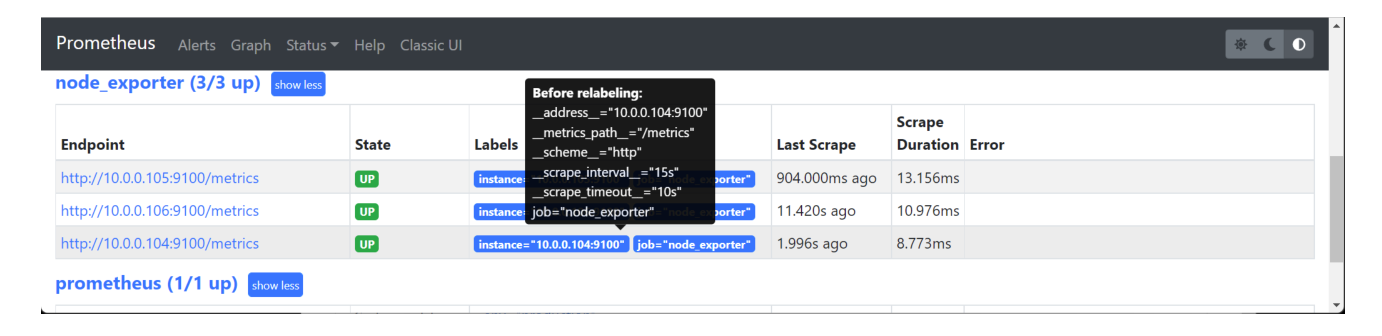
示例:添加主机标签
vim /usr/local/prometheus/conf/prometheus.yml
  - job_name: 'node_exporter'
  static_configs:
  - targets: ['10.0.0.104:9100','10.0.0.105:9100','10.0.0.106:9100']
    labels:
      node: "worker node"
      type: "test"
  - job_name: 'zookeeper'
    static_configs:
    - targets: ['10.0.0.105:7000','10.0.0.106:7000']
      labels: {app: 'zookeeper', type: 'dev'}
        #app: 'zookeeper' #或者这种格式也支持
        #type: 'dev'
2、relabel_configs 和 metric_relabel_configs
抓取而来的指标在保存之前,还允许用户对指标重新打标并过滤的方式
它定义在job配置段的metric_relabel_configs配置中,常用于实现如下功能
   1、删除不必要的指标
   2、从指标中删除敏感或不需要的标签
   3、添加、编辑或修改指标的标签值或标签格式
relabel_config、metric_relabel_configs这两个配置虽然在作用上类似,但是还是有本质上的区别的,这些区别体现在两个方面:执行顺序和数据处理上。
| 区别 | 解析 |
|---|---|
| 执行顺序 | relabel_configs用与scrape目标上metric前的标签设置,也就是说在scrape_configs前生效,针对的是target对象本身metric_relabel_configs 作用于scrape_configs 生效后,即针对target对象上的metric监控数据 |
| 数据处理 | metric_relabel_configs 是 prometheus 在保存数据前的最后一步标签重新编辑,针对的是metric对象 默认情况下,它将监控不需要的数据,直接丢掉,不在prometheus 中保存 |
对target重新打标
job的标签设定为配置文件中其所属的job_name的值
__address__标签的值为该target的套接字地址"<host>:<port>"
instance标签的值为__address__的值
__scheme__标签的值为抓取该target上指标时使用的协议(http或https)
__metrics_path__标签的值为抓取该target上的指标时使用URI路径,默认为/metrics
__param_<name>标签的值为传递的URL参数中第一个名称为<name>的参数的值,此项依赖于URL中是否存在参数

它们将按照定义的顺序依次执行
    删除不必要的指标
    从指标中删除敏感或不需要的标签
    添加、编辑或修改指标的标签值或标签格式
要注意的是,更改或添加标签会创建新的时间序列
    应该明确地使用各个标签,并尽可能保持不变,以避免创建出一个动态的数据环境
    标签是时间序列的唯一性约束,删除标签并导致时间序列重复时,可能会导致系统出现问题
示例:
#示例:删除指标名node_network_receive开头的标签
metric_relabel_configs:
- source_labels: [__name__]
  regex: 'node_network_receive.*'
  action: drop

#示例:替换
metric_relabel_configs:
- source_labels: [id]
  regex: '/.*'
  replacement: '123456'
  target_label: replace_id
最后编辑:于浩 更新时间:2026-07-03 14:50